

Email Signatures

moody bridge

Email Signatures

In the digital age, an email signature is akin to letterhead and is an official representation of Moody College. Email signature blocks should not contain logos, images, personal statements or quotes.

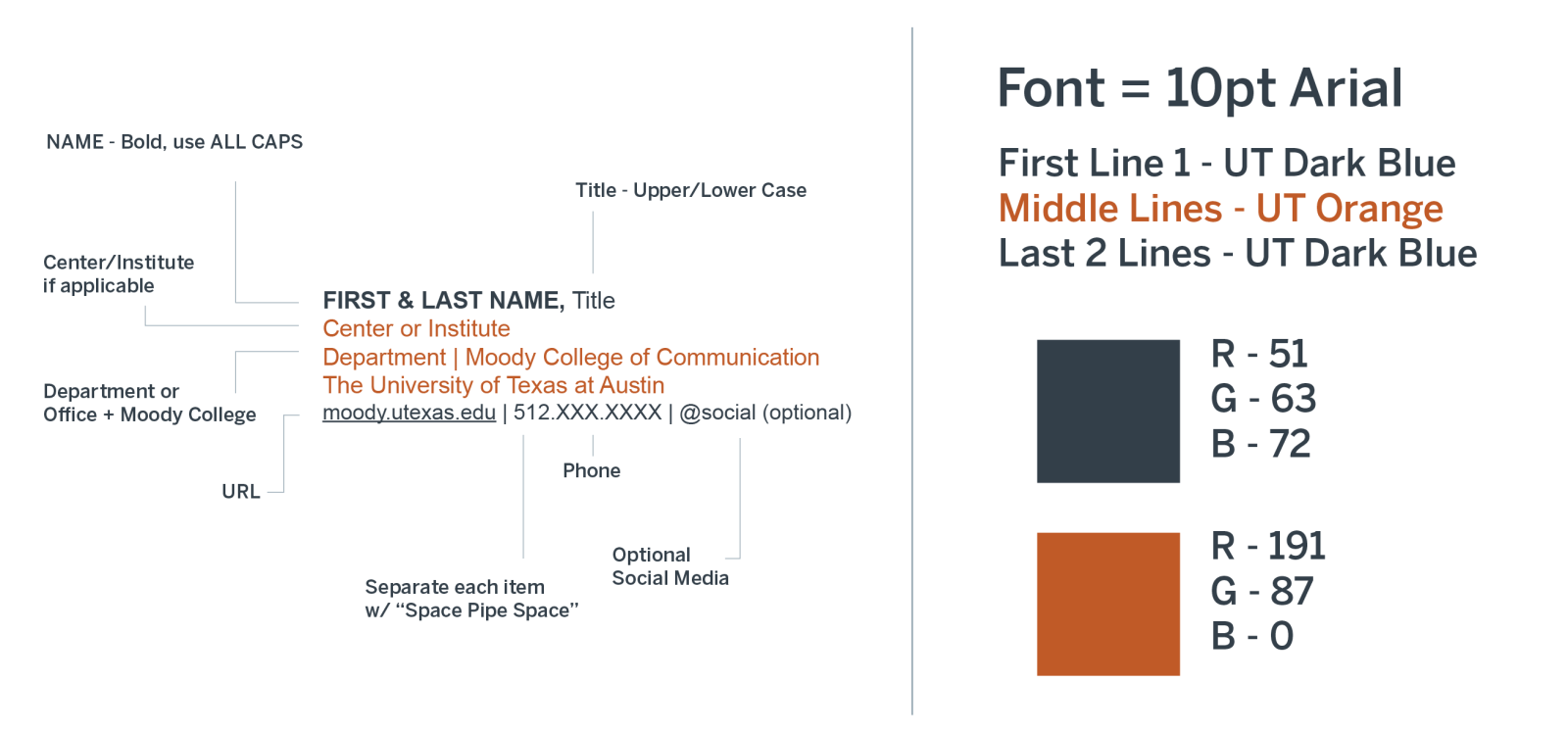
Example of how an official Moody Signature should be formatted.
Diagram of an official Moody College Email Signature. The font should be 10pt Arial and UT Dark Blue. First and last name are in all caps with a comma then separating the name and job title. The second line should be set in UT Orange, where center and institute should be listed, if applicable. The next line, also in UT orange, should have your department and the full college name separated by a pipe symbol. The last line should be in UT Dark Blue which has the moody URL and phone number separated by a pipe.

Required elements for all Moody College faculty and staff:
Moody College of Communication
The University of Texas at Austin

Recommended elements: (required for Dean's office/Dean's direct reports)
Format 
Colors

Basic tasks to create your signature include:

  1. Copy formatted text from supplied powerpoint file email-signature.pptx.
  2. Paste into your default (or create new) signature within your mail program.
  3. After you paste, choose "keep source formatting" by clicking on the clip